Built for small screens
Results in under 60 seconds
Browser or native app - your choice
Daily updated data
Answer a few simple questions and get a personalized shortlist of stocks in just a few minutes. No spreadsheets to navigate and no complicated setup required. Simply open Belegget on your phone and start screening.
✓ Instant access · ✓ No credit card · ✓ Works on any phone
Don't know where to start? The Smart Filter in our mobile stock screener does it for you
Instead of handing you 30 sliders and hoping for the best, the Smart Filter asks you three questions in plain English. Your investment horizon. The kind of company you're after. The phase it should be in. That's it - the mobile stock screener takes those answers and builds your filter automatically.
Plain-language questions
No finance degree needed - you answer, the tool filters
Personalized stock list
Your results reflect your goals, not a generic market scan
Done in under 2 minutes
From open app to a list of matching stocks, faster than brewing coffee
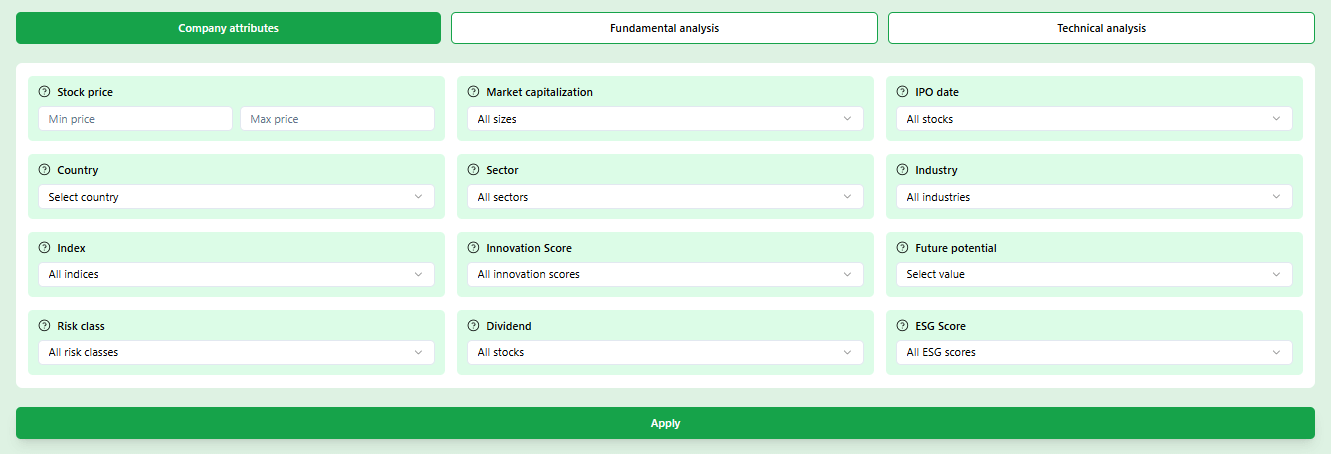
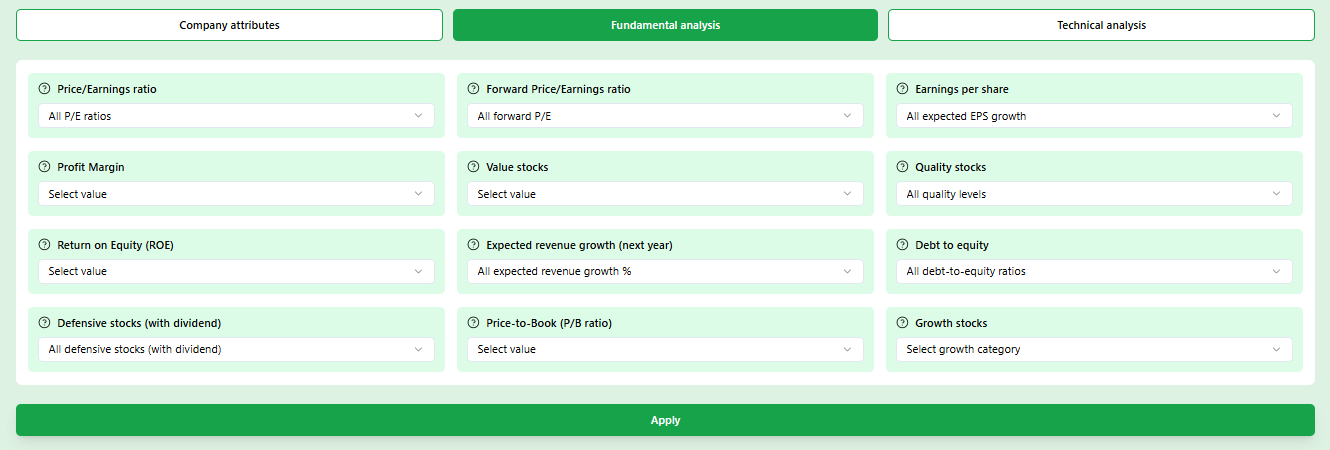
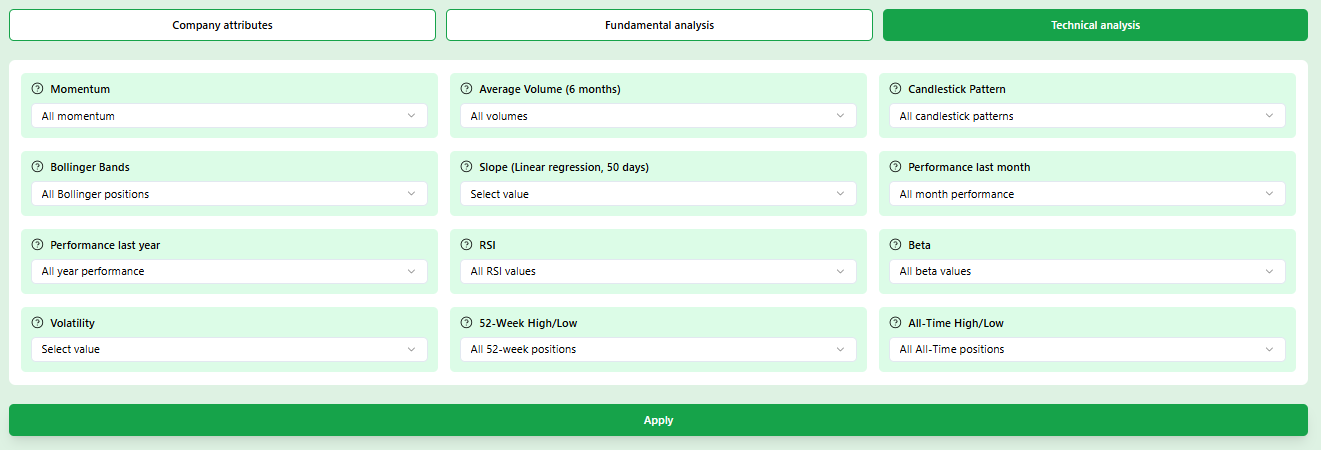
Prefer manual control? The mobile stock screener gives you all 30+ filters
If you already know what you're looking for - a specific P/E range, a minimum market cap, a particular country - you can go straight to the filter panel. The mobile stock screener gives you everything that's available on desktop, directly on your phone. No cut-down version, no missing filters.
Fundamental filters
P/E, P/B, EV/EBITDA, debt ratio, revenue growth, margins
Technical filters
RSI, 52-week high/low, Bollinger Bands, momentum signals
Company filters
Sector, region, market cap, dividend yield, IPO year
How a mobile stock screener works - from open to results in 4 steps
No setup, no learning curve. This is the exact flow every time you use Belegget's mobile stock screener
Open Belegget
Use the Belegget app or open the website on your phone to start screening stocks in seconds.
Available on iPhone, Android, and modern web browsers
Answer a few questions
The Smart Filter asks about your investment horizon, preferred company size, and growth vs. stability preference.
Takes under 90 seconds
Get your shortlist
The mobile stock screener applies 6-8 filters automatically based on your answers and returns a curated list of matching stocks.
Typically 15-40 results
Dig deeper or refine
Tap any stock for the full detail page, or add manual filters to narrow further. Save anything interesting to your watchlist.
Watchlist syncs across devices
Most users run their first mobile stock screener session during a commute or a coffee break. No dedicated research time required.
Why screen stocks on mobile instead of desktop?
It's not about convenience for its own sake - there are real advantages to having a screener in your pocket
Act on ideas while they're fresh
You read a headline on the train about a sector shift. With a desktop screener, you'd write it down and forget it by tonight. With a mobile screener, you're already filtering by that sector before the next stop.
Check in without sitting down
Portfolio reviews don't have to happen at a desk. A quick scan of your watchlist during lunch or a market summary before bed keeps you informed without blocking two hours of your evening.
No context-switching
When research happens on the same device you read news and chat with people, ideas connect faster. The screener becomes part of how you naturally process market information, not a separate ritual.
Fewer impulsive decisions
Having filters set on your phone means you always check criteria before getting excited. That check is a natural brake on the kind of impulse buy that desktop investing makes too easy.
Mobile screener vs. desktop screener
What to look for in a mobile stock screener
Not all mobile screeners are equal. Here's how to spot the difference between one that actually works and one that just pretends to
A mobile stock screener should be easy to use wherever you are. Filters, settings, and stock results should work smoothly on your smartphone so you can quickly find and review stocks without unnecessary steps.
Changing a filter should immediately update the stock list. Page reloads on mobile are slow and break the flow of your research.
The best mobile stock screeners don't assume you know which metrics to filter on. A questionnaire that builds filters from plain-language answers is a genuine advantage for most investors.
P/E ratio, EV/EBITDA, free cash flow - these terms mean nothing without context. A good mobile screener explains each filter in plain English, right where you're using it.
Being able to save a screen you've built and come back to it the next day saves time and encourages disciplined, repeatable research habits.
Many screeners are technically accessible on mobile but were never designed for it. Tiny buttons, horizontal scrolling, and text that needs zooming are all signs the tool doesn't belong on your phone.
Start your first screen today - for free
It takes less than two minutes to go from zero to a filtered list of stocks that match your profile. No credit card, no installation.
✓ No credit card required ✓ Instant access ✓ Free basic features
What makes Belegget different
Five things Belegget's mobile stock screener does well - and why they matter
Not a feature list - a look at what works in practice for investors who screen on the go
The Smart Filter builds your screen for you
Most investors don't fail because they lack data - they fail because they don't know which data to look at. The Smart Filter solves this by asking you questions instead of expecting you to already know the right filters. You say you want a mid-sized company, growing steadily, in a sector you understand. The tool turns that into a real filter combination. The result isn't a random list of stocks - it's a shortlist shaped by your actual preferences. On mobile, this is especially useful because you're never going to sit and fiddle with 30 sliders on a small screen. Three questions, a tap, done.
Fundamental data you can actually read on a phone
Financial data on mobile usually means squinting at a number-heavy table that was designed for Excel. In Belegget, fundamental metrics are laid out one by one with context. Revenue growth over the last three years. Gross margin compared to sector average. Debt-to-equity in plain terms. Each number has a short label explaining what it means and whether the current value is considered healthy or a warning sign. This is how you make a genuine assessment on a phone - not by scrolling past 40 columns, but by seeing the five numbers that actually matter for your decision.
Sector and region filters that reflect how you actually think
When you read that European defence spending is rising, you don't think in SIC codes - you think 'I want European defence companies.' That's exactly how the sector and region filters work here. Pick a sector from a clean list, pick one or more regions, and the screener immediately narrows to companies that match both. You can also combine this with a market cap filter to focus on smaller players in a growing space, or larger established names in a stable sector. The filter combinations are flexible, and the results update without any page reload.
Market cap filter: decide which size of company to focus on
The difference between a micro-cap and a large-cap isn't just the number of zeros - it's a completely different risk and return profile. Micro-caps under €300M can double in a year, but they can also drop 60% on a single bad quarter. Large-caps above €10B move more slowly but are far more predictable. The market cap filter in the screener lets you pick a range that matches your risk appetite. If you're building a long-term core portfolio, you might focus on €1B–€10B companies. If you're looking for higher-risk growth bets, you filter below €500M. The screener then shows only what fits.
Technical filters for timing and momentum on the go
Not every investor cares about technical analysis, but for those who do, the screener has it covered on mobile. You can filter by RSI to find oversold stocks in a longer-term uptrend. You can screen for stocks within 10% of their 52-week high - a classic momentum signal. Bollinger Band filters help identify stocks that are compressing before a breakout. BEA signals, all-time high proximity, and monthly performance filters are all there. The important thing is that these aren't buried - they're in the same filter panel as everything else, designed to work with a thumb instead of a mouse.
3 mistakes investors make when using a mobile stock screener
The tool is simple, but these habits quietly undermine results. Worth knowing before you run your first screen
Setting too many filters at once
Ignoring the sector context
Using the screener as a buy signal
Ready to put a real screener on your phone?
Create a free account and run your first screen in the next five minutes.
Frequently asked questions
Common questions about screening stocks on mobile - answered directly
More guides on finding and analyzing stocks
Once you've found interesting stocks with the screener, these guides help you go deeper - whether you want to analyze what you've found, improve your process, or let an AI narrow things down further.
Stock Screener
A full walkthrough of how the Belegget stock screener works - filters, questionnaire, and how to build a search that fits your strategy.
How do I find good stocks?
Beyond the screener: what makes a stock worth researching, which fundamentals actually matter, and how to build a repeatable process.
AI Stock Picker
How Belegget uses AI to surface stock ideas based on your profile - and where it helps most compared to manual filtering.